 Book Sniper
Install Book Sniper on Windows
About two minutes. No Python, no extra tools — everything Book Sniper needs is inside the installer. Windows 10 (1809 or newer) or Windows 11, 64-bit.
Download the installer
Click Download the installer above. Your browser saves BookSniper-Setup-x.y.z.exe to your Downloads folder.
Open it from the browser's download bar or double-click it in Downloads.
"Windows protected your PC" — click More info, then Run anyway
Windows Defender SmartScreen shows this for programs it hasn't seen many times yet. It isn't a virus warning. Click More info (yellow box):
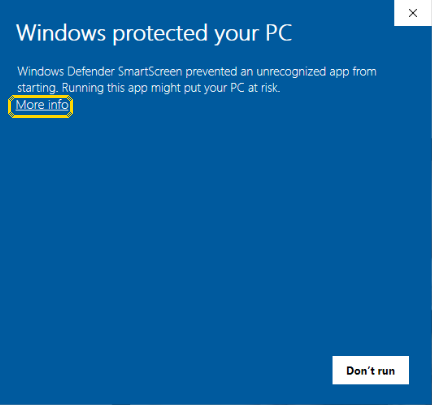
The same window then shows the app name and publisher, and a Run anyway button:
Choose "Install for me only"
Recommended: no administrator password needed, and Book Sniper updates itself silently later.
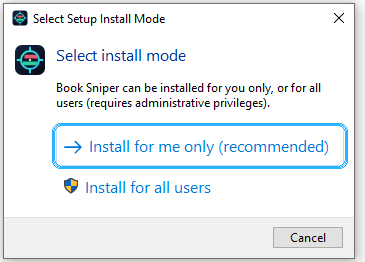
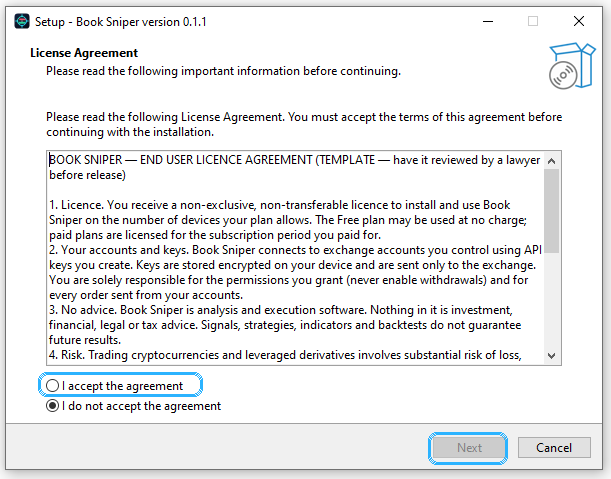
Accept the licence agreement
Read it, select I accept the agreement, then Next.
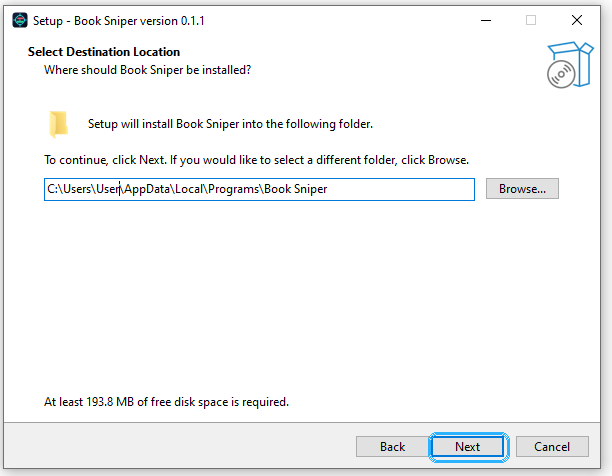
Keep the suggested folder → Next
Book Sniper installs into your own user folder (…\AppData\Local\Programs\Book Sniper) — about 200 MB.
Your settings, trades and encrypted keys live separately in %LOCALAPPDATA%\BookSniper, so updating or reinstalling never touches them.
If your PC lacks Microsoft Edge WebView2 (only very old Windows 10 builds), the installer adds it automatically.
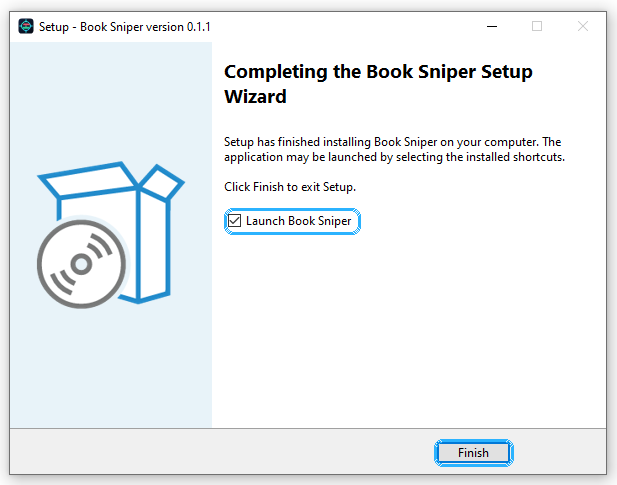
Finish — leave "Launch Book Sniper" ticked
First run: create your free account, connect an exchange
Book Sniper opens on the Depth Analysis with live market data — on Paper (simulated) trading until you connect an exchange.
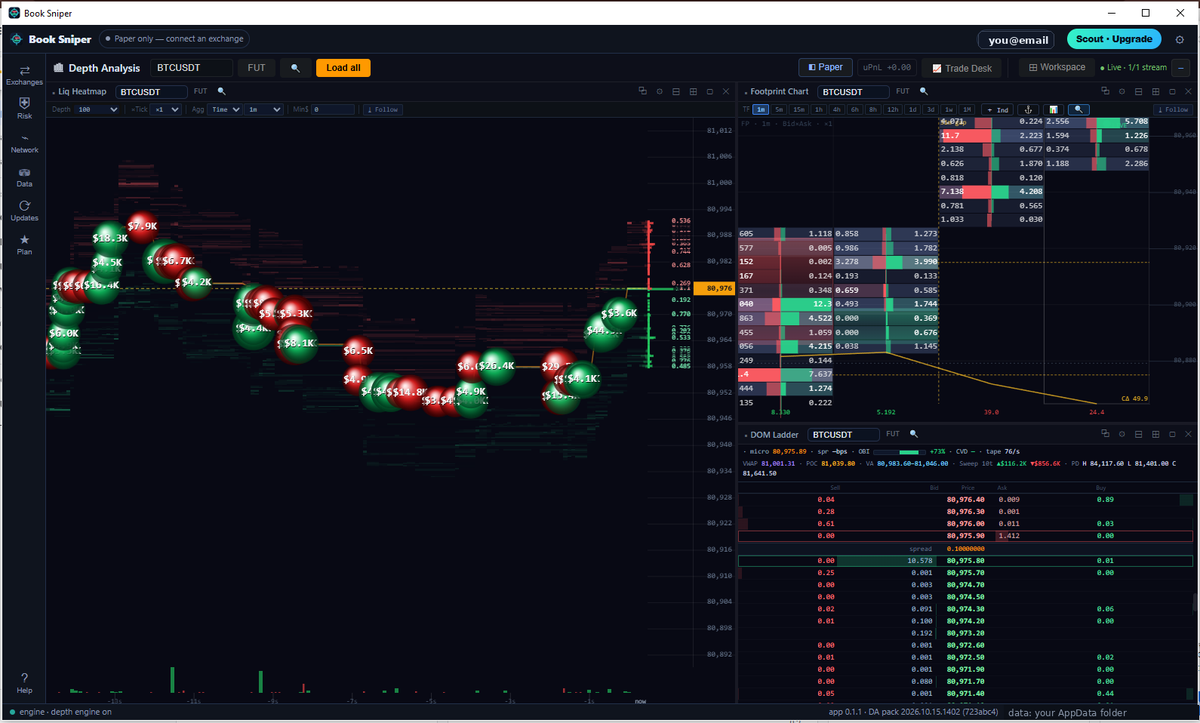
- Account: the welcome screen offers a free account (email + password, Google, or your existing Liquidity Sniper login). You can also skip and use Scout offline.
- Exchange: left rail → Exchanges → add an API key with trading permission only — never enable withdrawals. Keys are encrypted with Windows' own protection (DPAPI) and never leave your PC.
- Upgrade: top-right Scout · Upgrade → choose a plan; payment opens in your browser and the plan activates by itself.
Verify your download (optional, 30 seconds)
Open PowerShell (Start → type PowerShell), then:
PS> Get-FileHash $HOME\Downloads\BookSniper-Setup.exe
The Hash it prints must be exactly:
—Same value → the file is byte-for-byte the one we published (our server also refuses to serve a file whose fingerprint doesn't match the signed release). Different value → don't run it; download again from this page only.
Problems & questions
My antivirus quarantined the installer or BookSniper.exe
New, unsigned programs built with Python packaging are sometimes flagged by heuristics. Check the fingerprint (above); if it matches,
restore the file and add an exception for %LOCALAPPDATA%\Programs\Book Sniper. Tell us which antivirus it was so we can submit it for whitelisting.
The window is blank or doesn't open
Book Sniper falls back to your default browser automatically. To get the app window back, install or repair Microsoft Edge WebView2 Runtime, then start Book Sniper again.
"Book Sniper is already running"
It's still running in the system tray (bottom-right, maybe under ^) — click the icon to reopen it. Closing the window keeps it in the tray while positions, orders or 24/7 strategies are active.
No admin rights / company PC?
Use the Portable ZIP: unzip anywhere (e.g. Documents) and run BookSniper.exe. It updates the same way.
How do updates work?
Book Sniper checks for signed updates by itself (Control Panel → Updates). Feature updates install in seconds; app updates download, verify their signature and restart. Your data is backed up first.
Uninstall
Settings → Apps → Installed apps → Book Sniper → Uninstall. Your data folder %LOCALAPPDATA%\BookSniper is kept
(in case you reinstall); delete it by hand to remove everything, including your encrypted keys.
Still stuck?
Write to [email protected] with your account email and a screenshot, or use the chat on liquiditysniper.io.